Spirit's Voice: Building the Knowledge Assistant
I wanted to interact with Spirit — to be able to ask questions, explore ideas, and give others an assistant that helps them understand more than static blog posts ever could.
When I say “Spirit has a voice”, I don’t mean the trading engine, no that is still driven by a deterministic algorithmic trading engine. What’s new is a knowledge assistant that understands the TradeBOT project and can explain it conversationally.
I wanted Spirit to be able to understand questions about the project and answer them intelligently, using the same documentation, research notes, and code that power the system itself.
This post is the full story of how that happened: the architecture decisions, the local CPU-based model experiment, its limitations, and the pivot to a cloud-based LLM that ultimately made the assistant practical.
The Idea
Every serious technical project accumulates knowledge.
Architecture diagrams. Strategy specifications. Research notes. Journal entries. Code comments. Blog posts. TradeBOT is no different. After months of development, the repository now contains over 18,000 documents.
The problem: nobody is going to want to read all these documents!
So the idea was simple!
Build an assistant that can
- Access the entire knowledge base — code, documents, and blog posts
- Understand plain-English questions about the project
- Respond with accurate, grounded answers
- Operate at low cost
- Is genuinely useful
Not a chatbot for marketing.
A technical companion for the project.
The Architecture
Large Language Models are powerful, but they have two fundamental limitations:
- They don’t know your private data.
An LLM can’t see your GitHub repo, internal notes, or unpublished strategy files unless you provide them. - They hallucinate when guessing.
If asked about something specific to TradeBOT, a base model will confidently invent an answer.
What we need is a way to let the model reason in natural language but only over verified project data.
That’s where RAG (Retrieval-Augmented Generation) comes in.
Instead of training a custom model (expensive and unnecessary), RAG works by:
- Retrieving relevant documents from a knowledge base
- Supplying them to the LLM as context
- Letting the model generate an answer grounded in that material
In other words:
The model doesn’t “remember” TradeBOT.
It reads the relevant parts on demand.
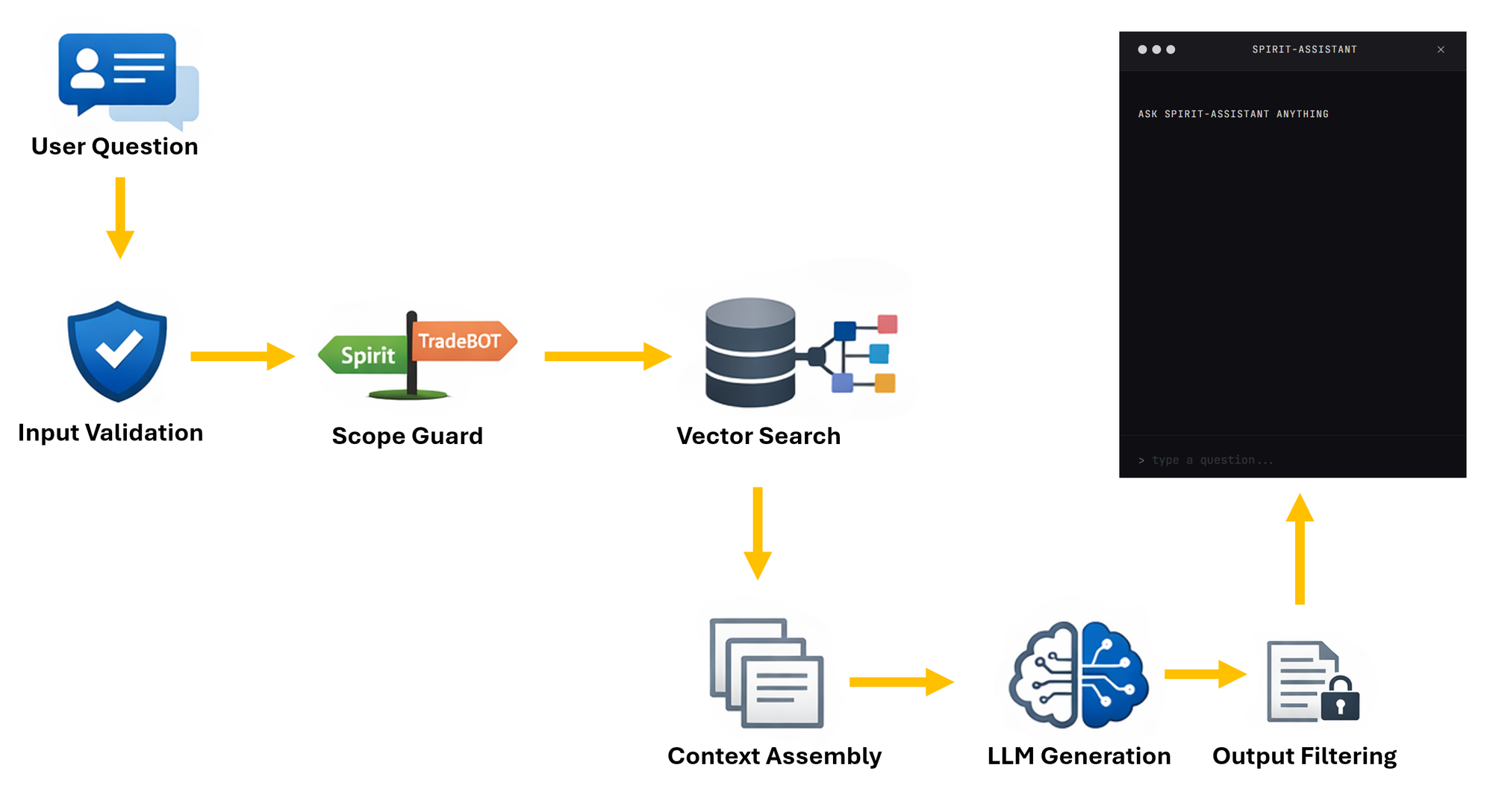
Data Flow
- A user asks questions — via the chat widget
- Input validation — length checks and basic prompt-injection detection
- Scope guard — is this question actually about Spirit or TradeBOT?
- Vector search — the question is embedded and matched against 18,000+ document chunks in a Chroma database using cosine similarity
- Context assembly — the top matching documents (filtered by a 0.7 similarity threshold) are formatted as context
- LLM generation — the language model receives the system prompt, retrieved context, and user question, then generates a response
- Output filtering — sensitive data (IP addresses, credentials, internal paths) is redacted before the response is returned
Embedding
To make over 18,000 documents searchable in a way that’s fast and practical, I used an embedding model — bge-small-en-v1.5. It’s small, efficient, and more than sufficient for semantic search.
The vector database is Chroma, running as a persistent local store on the cloud server. This setup allows relevant context to be retrieved quickly and consistently.
The entire RAG layer adds roughly 50ms per request.
That part wasn’t the problem.
The bottleneck was the language model and CPU.
Phase 1: Local model on CPU
The first version ran Phi-3-mini-4k-instruct, quantised to Q4_K_M (~2.5GB), on an 8 vCPU / 8GB RAM server.
No GPU...... No API...... Just pure CPU inference via llama.cpp.
This was intentional. I wanted to understand what a fully self-hosted, zero-cost LLM setup looked like in practice.
Just a model file and a server.
What Worked
- It ran reliably and fit comfortably in memory.
- Everything stayed private, no external API calls.
- The RAG pipeline performed well. Retrieval consistently surfaced relevant documents.
- A curated Q&A set (60+ embedded answers) provided solid grounding.
What Didn’t
- Speed: Average response time: 31.8 seconds. Some queries exceeded a minute. For a blog chat widget, that’s unusable.
- Rambling output: The model often generated follow-on Q&A pairs, leaking training structure into responses. Stop tokens didn’t reliably prevent this.
- Weak instruction control: Despite strict prompting, answers regularly expanded to 600–1,300 characters when 200–300 would have been enough.
- Poor question generalisation: It handled “How do I subscribe?” correctly, but failed on “Can I subscribe?” — producing an incorrect answer.
Individually, these are tuning problems.
Together, they make the system unsuitable for real-time, user-facing use.
Benchmark Baseline
I built a small 15-question benchmark covering curated matches, technical queries, onboarding, conversational input, and out-of-scope tests.
| Metric | Phi-3-mini (CPU) |
|---|---|
| Avg response time | 31.8s |
| Avg quality score | 77% |
| Avg response length | 565 chars |
| “Can I subscribe?” | 0% (wrong) |
| “Write me a poem” | Generated poem (17s) |
The 77% score looks respectable.
But easy questions passed. Edge cases failed badly.
And the latency alone made the experiment impractical.
The Decision to Move
I had a choice: optimise the local setup further, or pivot.
Fine-tuning was ready. I’d built a full QLoRA pipeline — 4-bit training, rank 16, targeting attention layers — using my local RTX 4070 (12GB). Training on the curated Q&A set would likely have improved instruction following and reduced rambling.
But it wouldn’t solve the core problem: CPU inference speed. And it wouldn’t give me headroom for smarter behaviour later, like query rewriting or adaptive retrieval.
So I pivoted.
Phase 2: GPT-4o-mini via OpenAI API
The swap was surprisingly clean.
The system already had a clear separation between the RAG pipeline and the LLM layer. I added a new OpenAIModel class implementing the same generate() and generate_stream() interface, introduced a config switch (LLM_PROVIDER=openai), and deployed.
Same Chroma database.
Same scope guard.
Same output filtering.
Same chat widget.
Just a different brain.
The Results
| Metric | Phi-3 (CPU) | GPT-4o-mini | Change |
|---|---|---|---|
| Avg response time | 31.8s | 1.3s | 24× faster |
| Avg quality score | 77% | 83% | +6% |
| Avg response length | 565 chars | 294 chars | 48% shorter |
| “Can I subscribe?” | 0% | 100% | Fixed |
| Slowest response | 67.8s | 2.8s | — |
Every metric improved.
The rambling stopped completely. GPT-4o-mini answers the question and stops. Prompt instructions like “keep it short” and “no preamble” are followed precisely.
Question variation just works. Different phrasings map correctly to the same underlying answers.
Off-topic handling is graceful. Out-of-scope questions are politely redirected instead of producing confused output.
What About Cost?
GPT-4o-mini pricing is $0.15 per million input tokens and $0.60 per million output tokens.
Each request is logged:
OpenAI usage: 669 in + 71 out = 740 tokens | $0.000143 | 1.3s
That’s $0.000143 per call. Roughly $0.14 per day at 1,000 questions.
For this use case, cost is effectively negligible.
What About Privacy?
This is a real trade-off.
With Phi-3, everything stayed on the server. With OpenAI, user questions and retrieved context are sent externally.
For this assistant, I’m comfortable with that. The data involved is public: blog posts, documentation, strategy descriptions. The system never sends private trading data, API keys, credentials, or user-specific information. both in-put and output filtering removes internal infrastructure details before they could reach the model.
If this were handling sensitive user data, the decision would be different. For a public project assistant, the speed and quality gains outweigh the privacy cost.
What I Learned
Small models are educational, not production-ready for chat. Phi-3 taught me a lot, but CPU inference on sub-4B models isn’t there yet for interactive systems.
RAG quality matters more than model size. Retrieval worked well throughout. Failures came from instruction following and generation behaviour, not from missing context.
Clean architecture pays off. Because the LLM sat behind a simple interface, swapping models took about an hour. No rewiring. No migrations.
Benchmark early. Having numbers removed guesswork. The improvement was obvious.
What’s Next
The system is live and working well, but there’s more to do:
- Fine-tune GPT-4o-mini on curated Q&A to dial in tone and persona
- Add embedding-based scope detection before generation
- Expand curated answers based on real user questions
The local Phi-3 model remains available as a fallback. One config change brings it back.
But for now, the cloud model delivers a better experience at negligible cost.
Spirit can talk.